Time tracking
A Toggl Track alternative with screenshots
Toggl Track doesn’t take screenshots. See what it does well, where it stops, and how ProofHour records screenshots for hourly client work.

8 min read
Table of contents
As of 9 October 2026.
This is the first post in a weekly series comparing time trackers for people who bill clients by the hour. ProofHour is our product, so weigh what follows with that in mind. Everything about Toggl Track comes from Toggl’s own pages, listed at the end.
Why screenshots matter for hourly client work
When you bill by the hour, your client pays for work they cannot watch. A timer records how long you worked. It does not record what was on your screen during that time. A line like "6 hours, website changes" asks the client to take your word for the rest.
A screenshot taken during the work adds what a timer cannot: what you were looking at, at that moment. Three weeks later, when a client asks what took six hours on a Tuesday, a dated screenshot answers better than memory does. ProofHour’s homepage describes the problem this way: when you work remotely, your client can’t see the work happening, only the result.
Screenshots also carry a cost, because a screen can show private things. So the useful question is not only "does the tool take them?" but "who decides what is captured, and who sees it?"
What Toggl Track does well
Toggl Track is a broad time tracker, and for many people it is the right choice.
- Timers. It offers manual and real-time timers, including on the free plan. There are desktop apps for Windows and Mac and mobile apps for iOS and Android.
- Integrations. A browser extension lets you start timers from inside more than 100 tools, and the free plan includes Google and Outlook calendar integrations.
- Idle detection. The desktop apps can alert you when you have been away from the keyboard, then let you keep or discard that time.
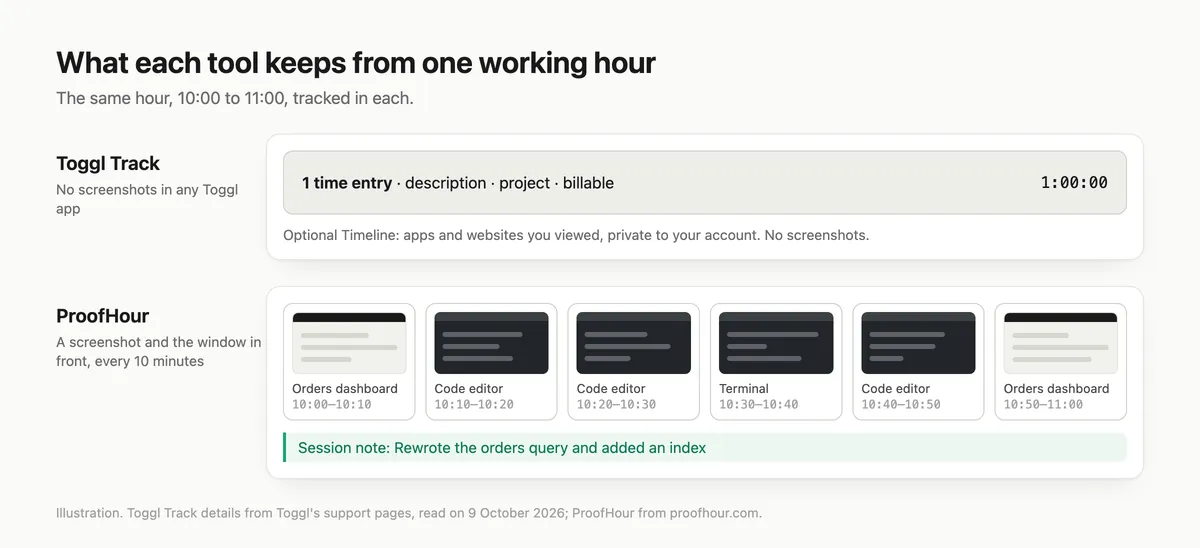
- Timeline. In the Windows and Mac desktop apps, you can turn on Timeline, which logs the websites and programs you view for more than 10 seconds, along with window titles. It is private to your account, and you decide which activity becomes a time entry.
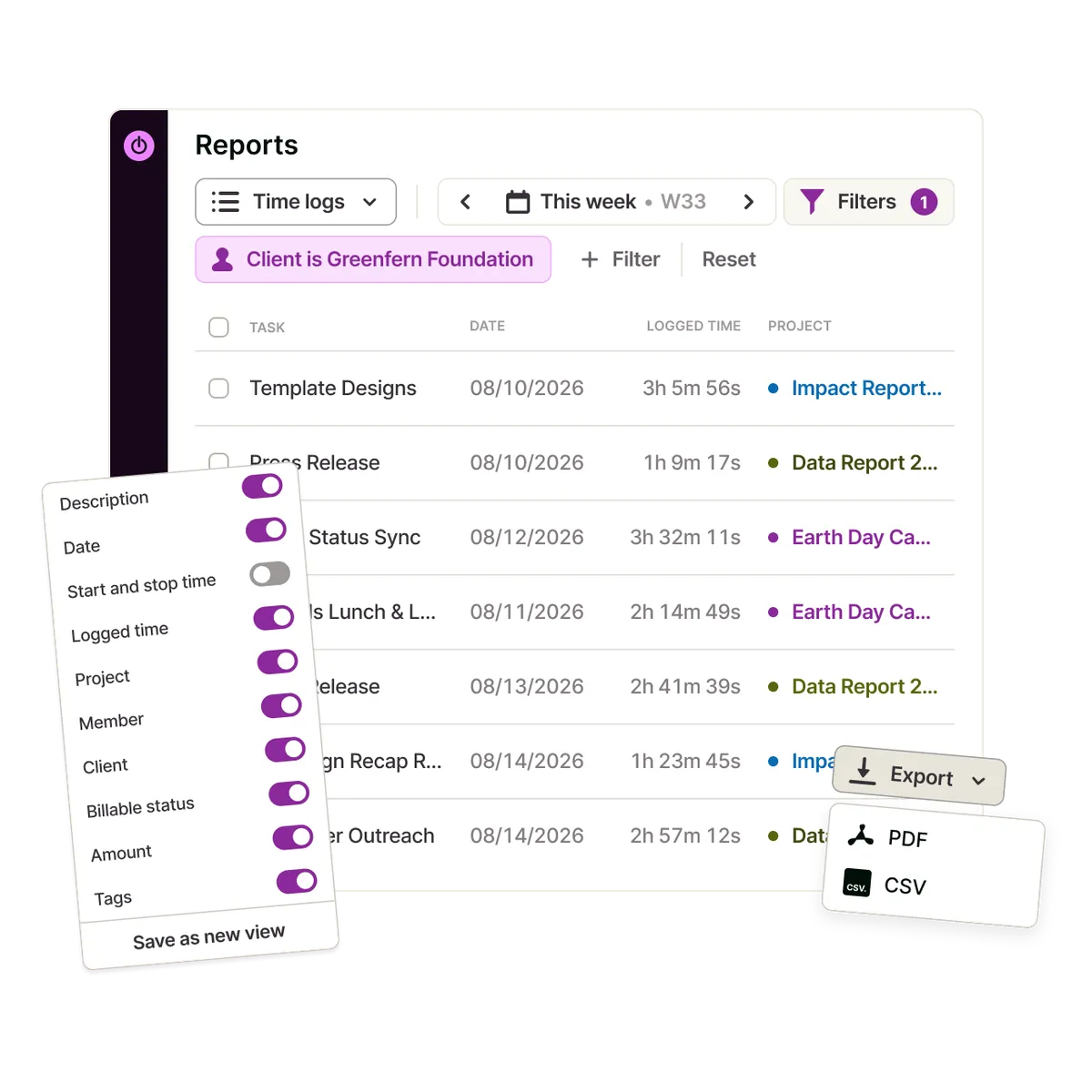
- Billing and reports. Billable rates start on the Starter plan. A Detailed report can be filtered to one client or project and downloaded as a PDF to send yourself. Saved reports can be shared through a public link that people outside your organization can open.
- Invoice numbers. Toggl’s invoicing page says it gives you the hours by client and project, marked billable, with your rates applied. You export them as CSV or PDF and use them in the invoicing tool you already have.
- Pricing. There is a free plan for a limited number of users. Starter starts at $9 per user per month, Premium costs more, and Enterprise is priced by contacting Toggl.
Where Toggl Track stops
Toggl’s support article on the question is direct: Toggl Track "does not support screenshot functionality or app usage monitoring in any of our apps." The same article says Timeline does not take screenshots either, and that its data is not visible to any other user.
Toggl presents this as a matter of principle: the article talks about building trust between teams, and the pricing page repeats that there are no screenshots. It is a position, not a missing feature.
For a freelancer, the consequence is specific. Toggl can show a client which hours you tracked, on which project, as a PDF or a shared report link. It does not produce a record of what your screen showed. Timeline records apps and websites rather than screens, and because Toggl keeps it private to your account, it works as a memory aid for you.
How ProofHour handles screenshots
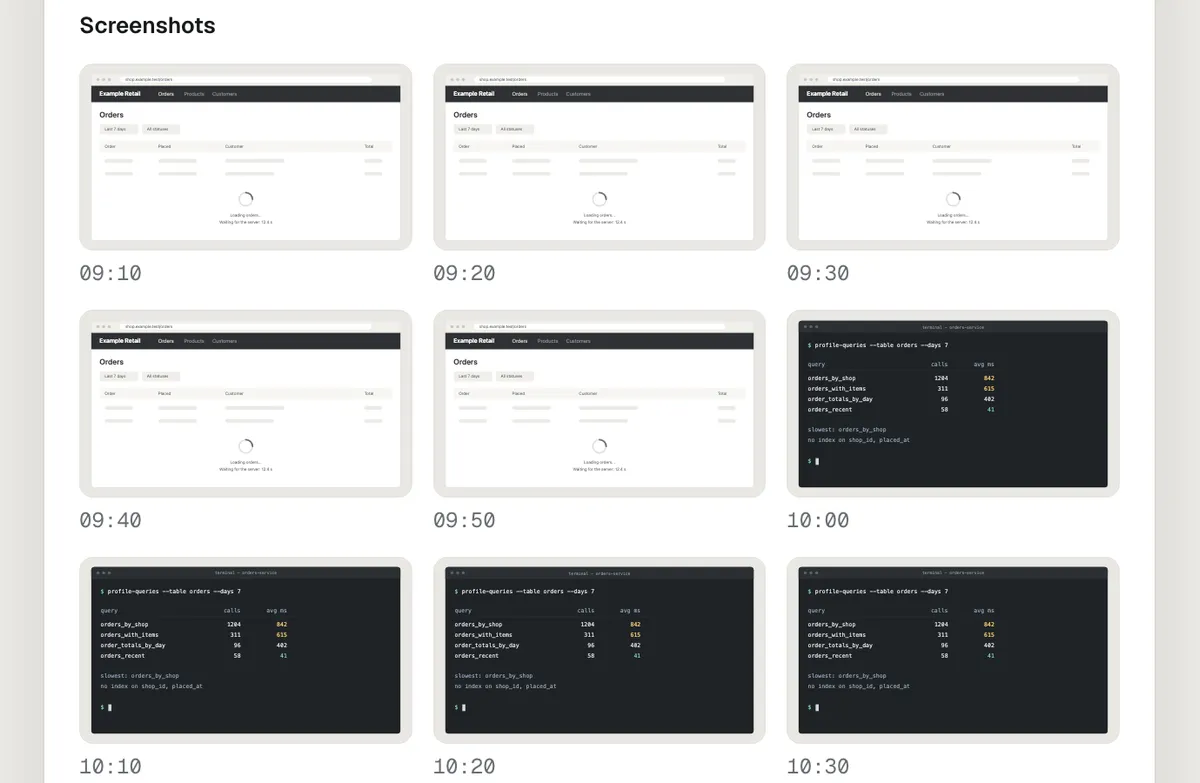
ProofHour takes the opposite approach. While you track, it records your time in 10-minute blocks, each with a screenshot of your screen and the name of the window in front, plus the note you give each session.
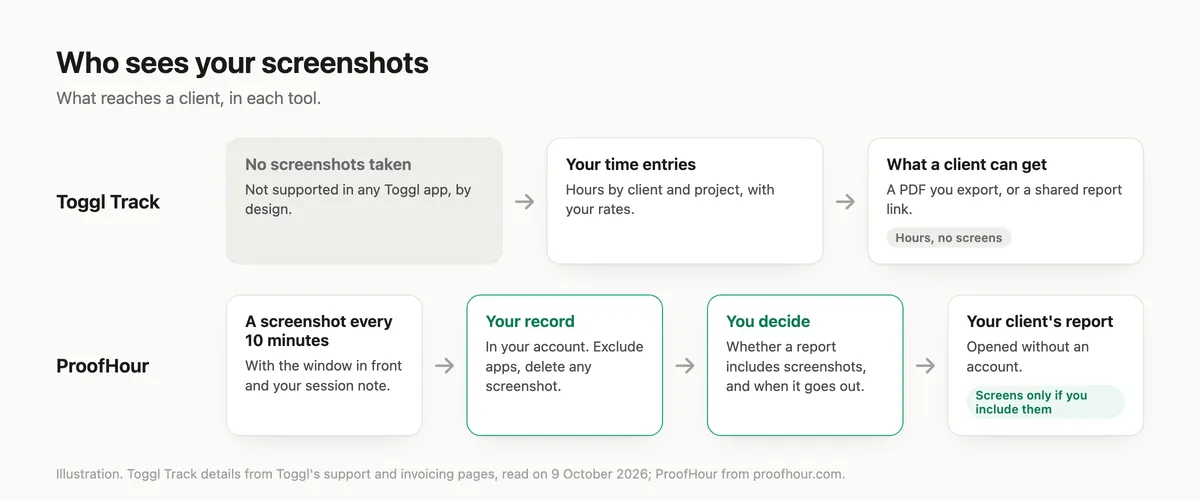
Those screenshots are part of your work record, stored in your account in Frankfurt, Germany. What your client sees is up to you:
- The client sees what you send. The homepage says your client only sees what you choose to send, and that nothing is shared until you send it. The download page says you decide whether a report shares any screenshots.
- You approve reports. ProofHour drafts a report on the schedule you set, and it goes to your client only when you press Approve and send. You can review it and choose what it includes first. The exception is a contract where you have turned on automatic sending, which is off until you turn it on, contract by contract. Those reports go out on schedule without review.
- Your client needs no account. They open the report or invoice you send.
- You control capture. You can name applications to exclude. While one is in front, no screenshot is taken and no window title is stored, though the time is still recorded. You can delete any individual screenshot, and the time recorded with it is deleted too. Screenshots are deleted automatically after 12 months, while the record that the hours were worked and billed stays.
- AI summaries are optional. On a contract where you switch them on, the screenshot itself is sent to ProofHour’s AI provider to be described. Turn them off and none is sent.
On the Mac, the app needs Screen Recording permission before its first capture.
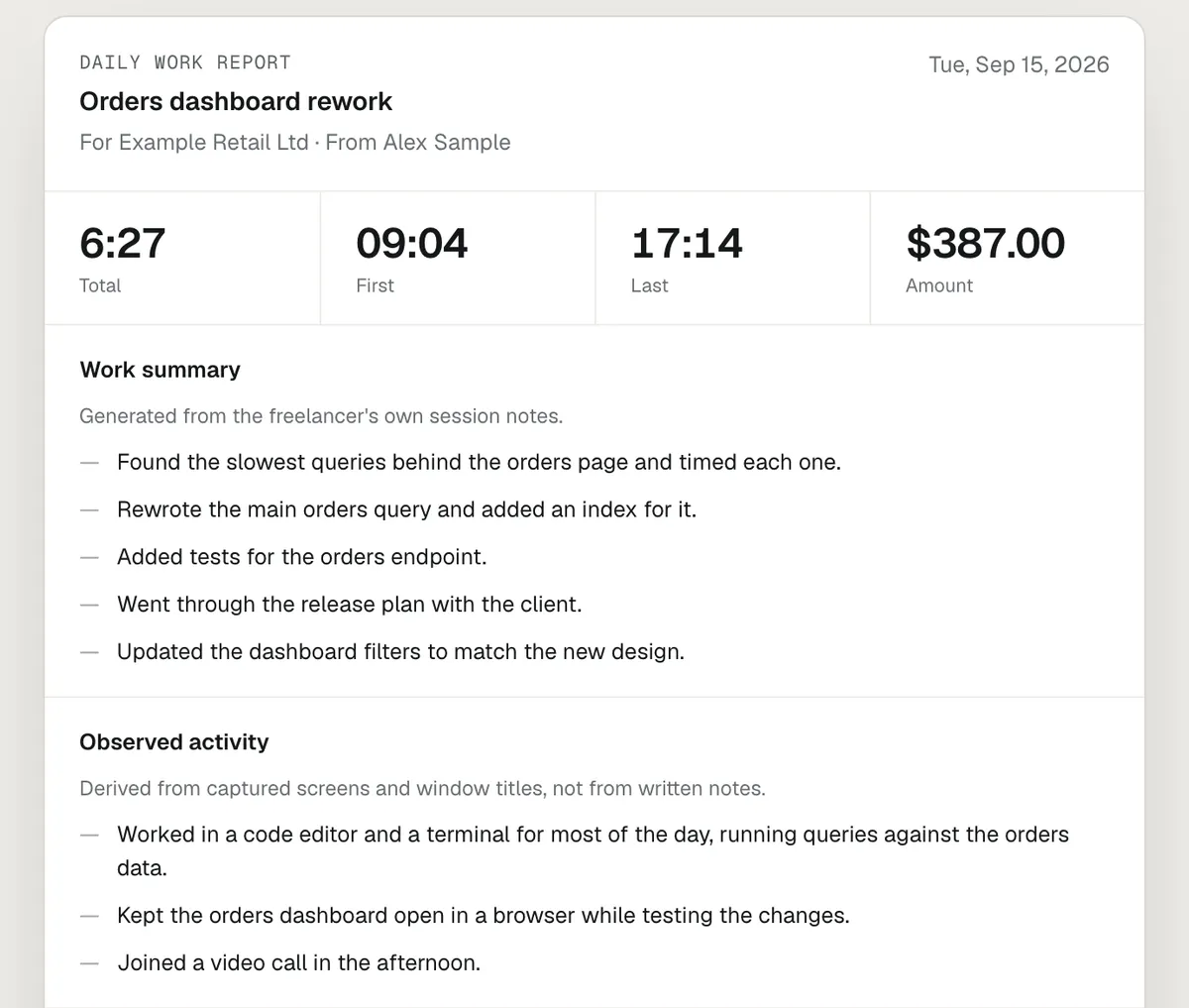
The sample client report shows what a client would open. It is a daily report with invented people and hours: tiles for total, first, last and amount, then a work summary, an "observed activity" section derived from captured screens and window titles, areas of work, the sessions, and the screenshots, each marked with its time. The same hours can become an invoice.
Toggl Track and ProofHour side by side
| Toggl Track | ProofHour | |
|---|---|---|
| Screenshots of your screen | Not supported in any Toggl app | One per 10-minute block while you track |
| What a client can receive | A PDF you export, or a shared saved-report link | A report or invoice you send; no client account needed |
| Invoicing | Hours and rates to export (CSV or PDF) for your own invoicing tool | Invoices created from your recorded hours |
| Apps | Windows, Mac, iOS, Android | Mac (Apple silicon) and Windows 10 version 1809 or later (x64) |
| Price | Free plan for a limited number of users; paid plans from $9 per user per month | $9.99 per month or $97 per year |
| Trial | 30 days on Starter and Premium | 30 days, no credit card required |
The ProofHour homepage also lists a founding offer: 50% off the first year for the first 50 customers.
Who should choose which
Stay with Toggl Track if you or your clients do not want screenshots, you track time inside many other tools through the browser extension, you need mobile apps, you run a team and want team-level reports, project estimates or timesheet approvals, or a free plan is enough and you already have an invoicing tool.
Choose ProofHour if you are a freelancer or contractor on hourly contracts, your clients ask what the hours went on, and you want a record with screens and notes, a report you review before it goes out, and an invoice built from the same record. You will need a Mac with Apple silicon, or a Windows PC running Windows 10 version 1809 or later (x64).
See what your client would get
The quickest check is the page your client would open. See a sample client report: the freelancer, client, hours and screens in it are made up. If it is the kind of proof your clients would want, the 30-day free trial needs no credit card.
Toggl and Toggl Track are names of their owner and are used here only to describe the product being compared.
Sources
Toggl (read on 9 October 2026):
- Screenshots and app monitoring: https://support.toggl.com/can-toggl-track-take-screenshots-of-my-employees-screen-while-they-work
- Timeline: https://support.toggl.com/the-timeline-feature
- Pricing: https://toggl.com/track/pricing/
- Plans and features: https://support.toggl.com/payment-plans-at-toggl-track
- Invoicing: https://toggl.com/features/time-tracking-invoicing
- Giving a client a report: https://support.toggl.com/how-to-generate-a-report-for-a-client
- Saving, sharing and scheduling reports: https://support.toggl.com/saving-sharing-and-scheduling-reports
- Idle detection (Mac app): https://support.toggl.com/en/articles/6151856-toggl-track-desktop-app-for-macos
- Idle detection (Windows app): https://support.toggl.com/en/articles/6176883-toggl-track-desktop-app-for-windows
- Apps and integrations: https://toggl.com/track/integrations/
- Product images: https://toggl.com/track/
ProofHour (read on 9 October 2026):
- Homepage, FAQ and pricing: https://www.proofhour.com/
- Privacy policy (effective 2026-10-09): https://www.proofhour.com/privacy
- Download page: https://www.proofhour.com/download
- Sample client report: https://www.proofhour.com/sample-report
Try ProofHour with your next client.
Reports and invoices from one record. Free for 30 days, no card.
Questions people ask
Does Toggl Track take screenshots?
No. Toggl says Toggl Track does not support screenshots or app usage monitoring in any of its apps, and its Timeline feature does not take screenshots either.
Is there a Toggl Track alternative that takes screenshots?
ProofHour records your time in 10-minute blocks, each with a screenshot of your screen and the name of the window in front, plus the note you give each session. The screenshots stay in your record, and your client sees them only in a report you choose to include them in.
Who can see the screenshots ProofHour takes?
You can. They are stored in your ProofHour account, and your client sees a screenshot only in a report you send with screenshots included. If you switch on AI summaries for a contract, its screenshots are also sent to ProofHour’s AI provider to be described.
Can I keep some apps out of ProofHour’s screenshots?
Yes. You can name applications to exclude. While one is in front, no screenshot is taken and no window title is stored, though the time is still recorded. You can also delete any single screenshot, which deletes the time recorded with it.
Does my client need an account to see a ProofHour report?
No. Your client opens the report or invoice you send without an account.
How much do Toggl Track and ProofHour cost?
As of 9 October 2026, Toggl Track has a free plan for a limited number of users and paid plans from $9 per user per month. ProofHour costs $9.99 per month or $97 per year, after a 30-day free trial that needs no credit card.